Welcome to the New Elgas My Account
We’ve upgraded My Account to provide a simpler, more modern experience that makes it easier to manage your LPG account online.
What’s new?
The new My Account includes:
- A refreshed dashboard with improved navigation
- Delivery date and delivery status visibility
- Simpler payment and re-ordering processes
- Improved performance across desktop, tablet and mobile devices
- Enhanced security for your account access
If you’ve already registered for My Account, you can continue to log in as normal. If this is your first time accessing the new experience, you’ll be guided through a quick one-time registration process.
How to Access My Account
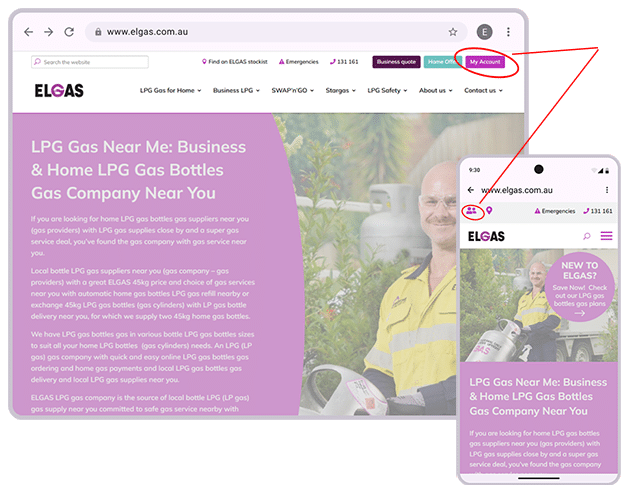
- Visit elgas.com.au
- Click My Account
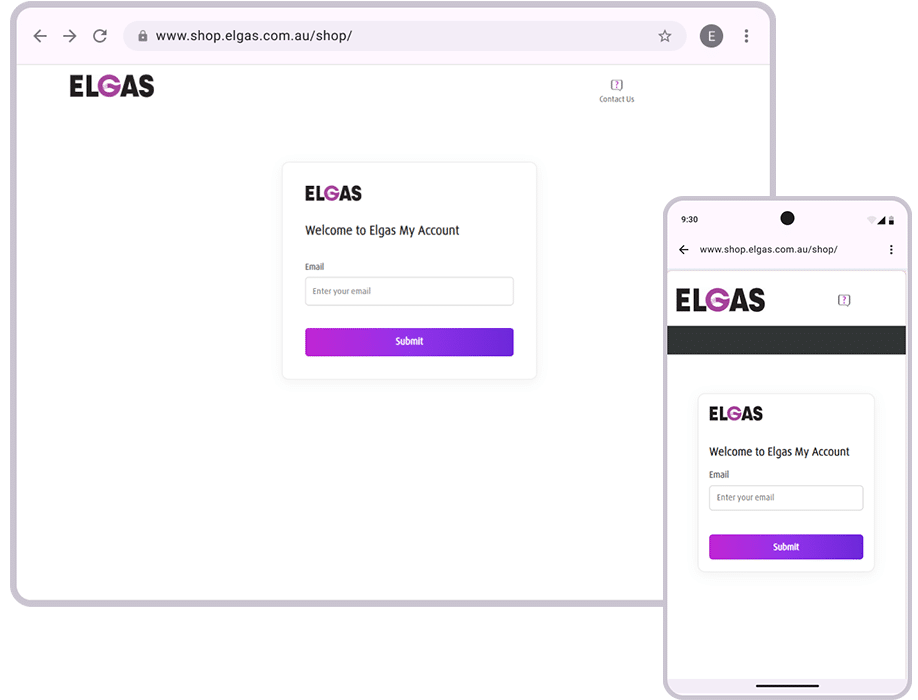
- Enter your email address
- Follow the prompts displayed on screen
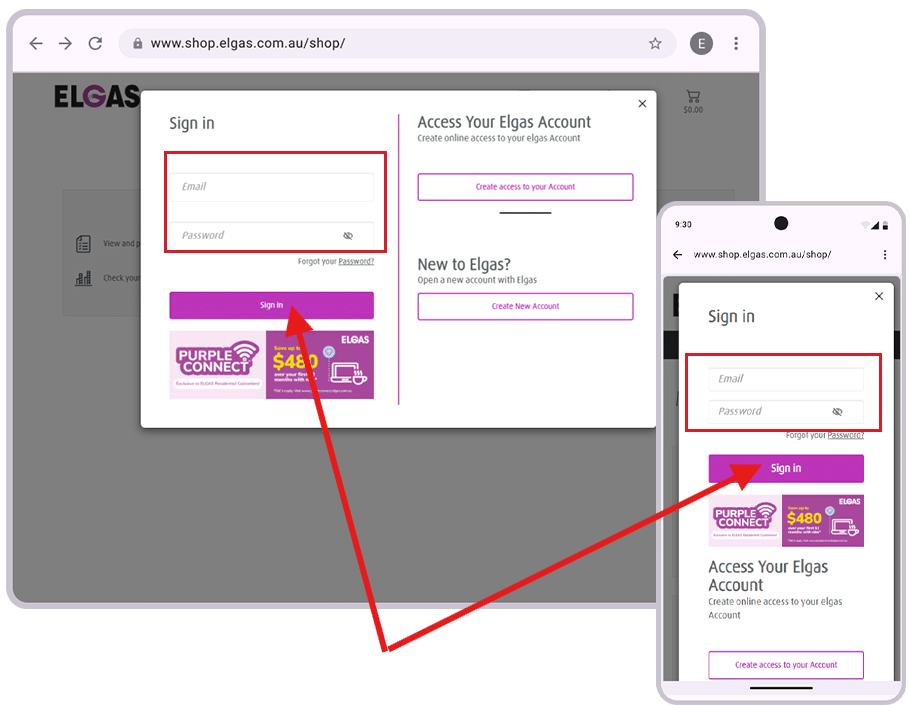
Depending on your account status, you may see one of several registration or sign-in pathways.
Scenario 1: You Already Have My Account Access
If you’ve previously registered for our New My Account:
- Enter your email address.
- Enter your password.
Scenario 2: You Have an Elgas Account but Haven’t Registered Online Before
If you’re already an Elgas customer but haven’t previously created an online login in our new platform:
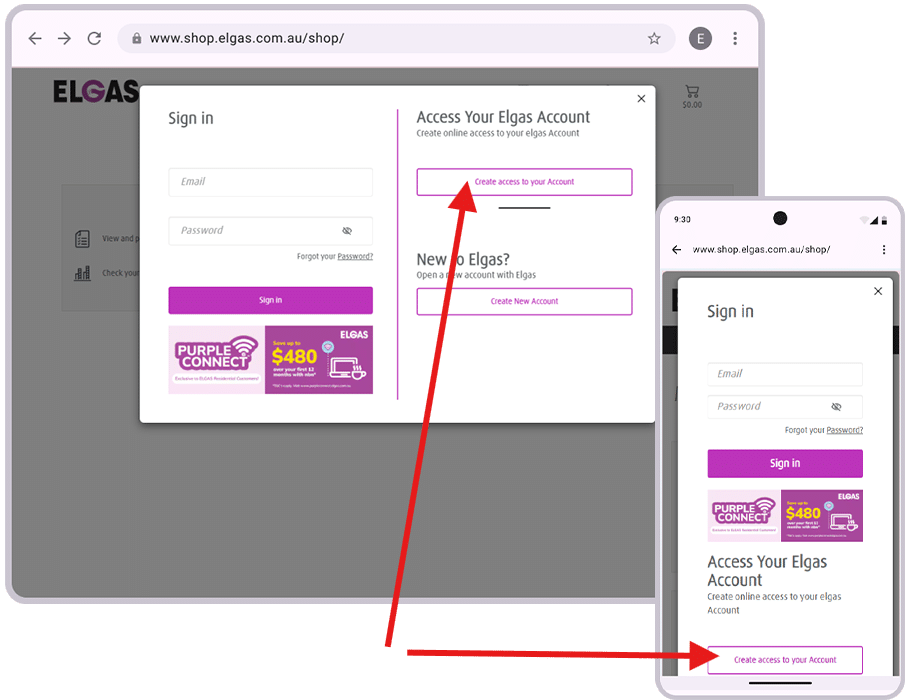
- Enter your email address.
- You’ll be asked to confirm your identity.
- Provide:
- Your 10-digit Elgas Customer Number
- Your postcode
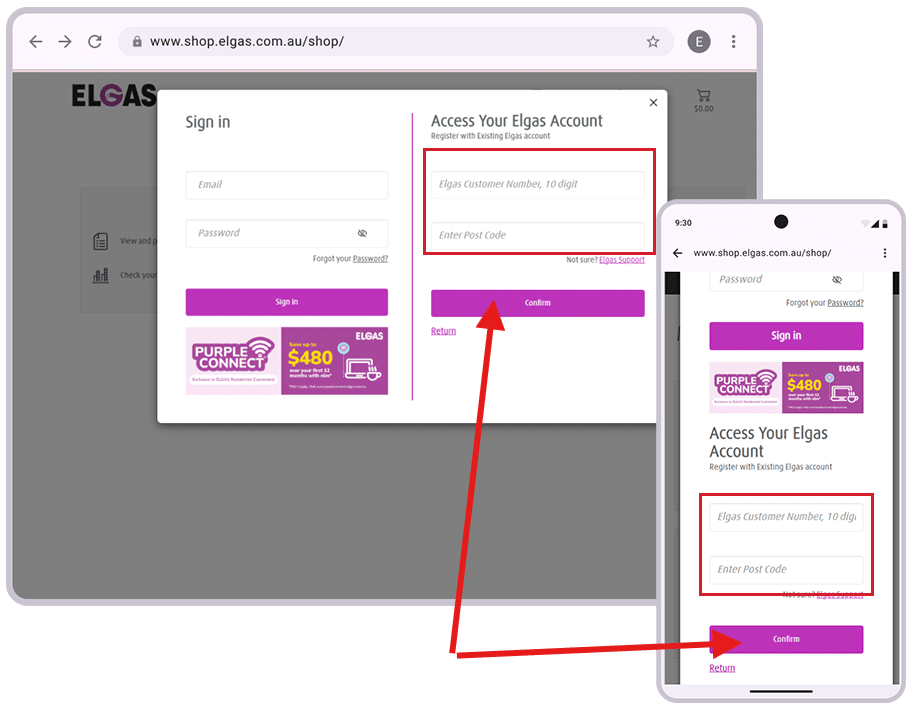
- Check your email for the security confirmation message.
- Click the verification link.
- Your account details will be matched automatically.
- Create your online access by setting a password that meets all the requirements.
- Review and confirm your information.
Most customer details will already be populated from your existing account, making registration quick and easy.
Scenario 3: You’re New to Elgas
If you don’t yet have an Elgas account:
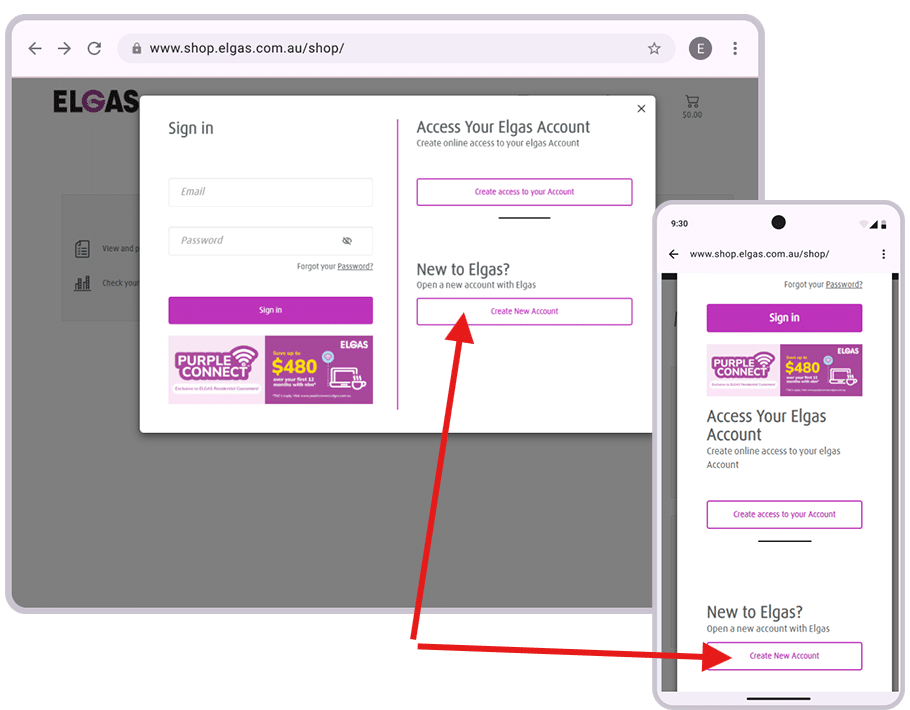
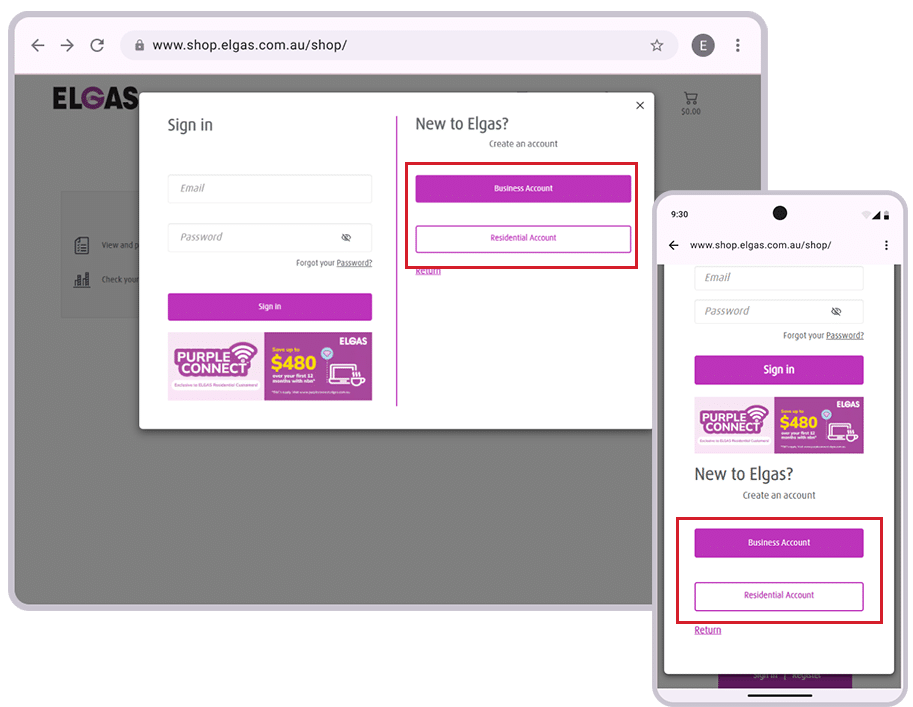
Residential Customers
- Select Residential Account.
- Select one of our fantastic offers
- Complete the new customer application.
- Submit your details
- Your new account details will hit your inbox soon, you’ll be able to start from Scenario 2.
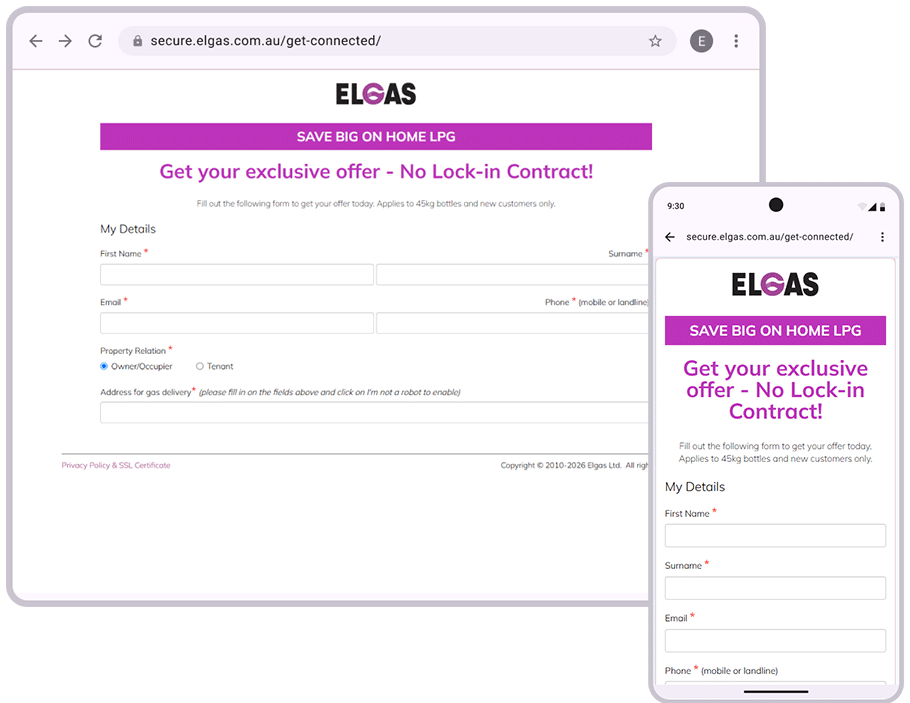
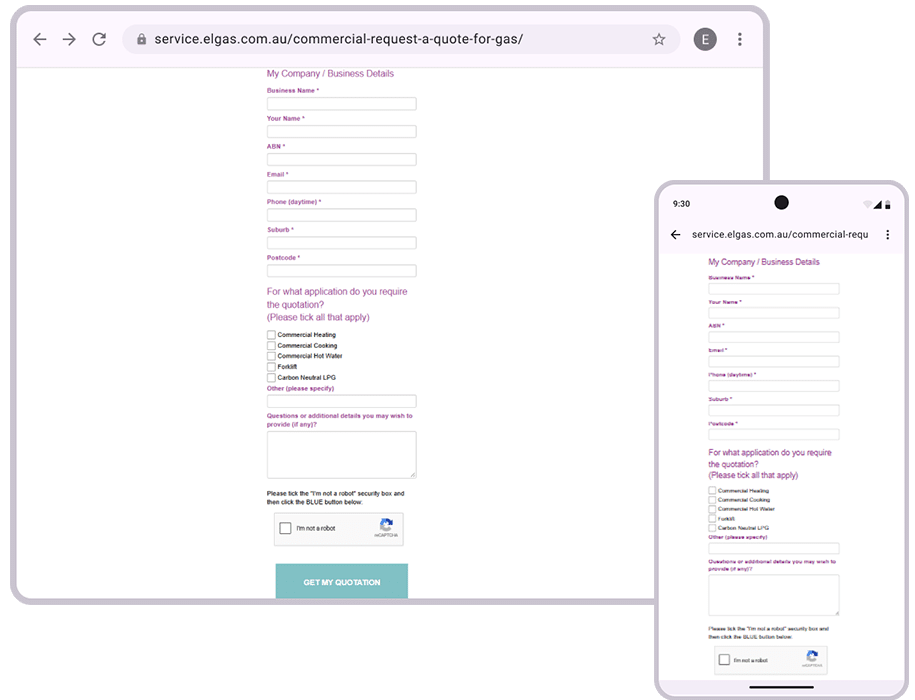
Business Customers
- Select Business Account.
- Complete the business account form.
- Submit your details.
- One of our reps will be in contact to get you set up with an account.
What if I’ve Entered the Wrong Information?
If the details you’ve entered don’t match the account information held by Elgas:
- The system will let you know that something doesn’t look right.
- You’ll have an opportunity to confirm whether you already have an existing account..
- Review your customer number, postcode and email address before trying again.
This helps ensure existing customers are directed to the correct registration process.
What if I Started Registration by Mistake?
If you enter the registration process but haven’t yet created an account:
• You’ll be directed to the appropriate sign-up page.
New Residential LPG customer?
New Business LPG customer?
Existing ELGAS customer?
Email Security Verification
To help protect your account, all customers completing registration or signing in for the first time may be asked to complete an email security verification.
When this happens:
- A verification email will be sent to your registered email address on the Elgas Account.
- Open the email.
- Click the verification link.
- Return to My Account.
- Continue signing in.
If you don’t receive the email, check your junk or spam folder before contacting Elgas for support.
Finding Things in the New My Account
After signing in, you’ll be able to access familiar features through the new dashboard, including:
- Order gas
- Make payments
- View delivery information
- Review account details
- Manage your online account
The new layout has been designed to make key tasks easier to find and complete.
Need Help?
If you’re having trouble registering, signing in, locating your customer number or verifying your email address, please contact Elgas Customer Service for assistance.
Frequently Asked Questions
Do I need to register again if I’ve already used the new My Account?
No. Existing registered users can continue signing in using their current login credentials. You may be asked to complete an additional security verification. You would have singed in by email not customer number.
Why am I being asked to verify my email?
Email verification helps protect your account and ensures only authorised users can access account information.
Where can I find my customer number?
Your 10-digit customer number can be found on your invoices, statements or other correspondence from Elgas.
What if I forgot my password?
Select Forgot Password on the sign-in page and follow the prompts to reset your password.
Can I still order gas and make payments online?
Yes. Ordering and payment functionality remain available and are now easier to access through the new dashboard.
Will I be able to see my delivery status?
Yes. The new My Account experience provides improved visibility of delivery status and delivery dates.